Frequently Asked Questions

Coffeemakers

Q Single-Serve Scoop™: How do I get the best cup of coffee from my Scoop™ Coffeemaker?
A In order to get a great tasting cup of coffee:  Scoop coffee grounds directly into the Scoop™ filter provided. For an 8oz. cup, scoop grounds to the first line mark in your scoop filter.  For up to a 14oz. cup, scoop grounds to the 2nd line mark (MAX) in your scoop filter.

If you prefer to use a traditional coffee scoop method to get started, measure coffee in the following way:
8-oz. cup = 2 tablespoons ground coffee
14-oz. cup = 3 tablespoons ground coffee

To get the perfect taste you prefer, adjust measurements up or down accordingly.

Please refer to your full Use and Care Guide for warnings, additional instructions, tips, and guidance on how to use this product.
Q Use: The safeguards in the Use & Care manual state to unplug the coffeemaker after use. Is this really necessary?
A Yes. You should unplug all countertop electric appliances when finished using. Unplugging the unit will disable the clock; however, it is not intended to be the principal time keeping device in the home.
Q Use: Why do I not get 12 actual cups from my 12-cup coffee maker?
A The standard serving size for coffee is 5 ounces, not the 8 ounce cooking unit of measurement for volume.
Q Use: What is the best temperature for brewed coffee?
A 175°-185°F is the standard brew and keep-warm temperature for coffee.
Q Use: Why is my coffeemaker overflowing?
A
If water is overflowing, the water reservoir is overfilled. There is a drain hole in the rear of the coffeemaker to prevent overfilling. If the overflow is coffee, you may have used more than one tablespoon of coffee per cup of water or not fully seated either the brew basket and/or the carafe underneath the brew basket.  Make sure you have correctly aligned the brew basket and the carafe and are using the correct amount of coffee grounds. Overflowing may happen more frequently with decaffeinated, flavored and finely-ground coffee. Overflowing may occur if the paper filter collapses inside the brew basket.  Use a good quality paper filter.
Q Use: Can I reheat cold coffee?
A
The warming plate is not designed to reheat cold coffee. 
*Tip: The best way to reheat cold coffee is in a mug in a microwave. Do not pour cold coffee back through the coffeemaker’s water reservoir – it will cause a blockage within the element and damage the coffeemaker.

Q Use: Can I put the carafe on a stovetop or in the microwave?
A No.  Never place the carafe on a stovetop or in the microwave.
Q Use: Why is my coffeemaker noisy?
A It is normal for a coffeemaker to produce  gurgling and boiling sounds near the end of the brew cycle as the last of the water cycles. This sound may also be heard anytime the unit is turned off and back on.
Q Use: Can I turn my coffeemaker off and then back on to keep the 2 hour automatic shut off from activating?
A Yes. However, if there is water in the reservoir, the coffeemaker will begin a new brew cycle.
Q Features: What makes the 1-4 cup mode different from other modes?
A The 1-4 cup mode slows the brewing process in order to get the full flavor of the coffee without having to use more coffee grounds.
Q Features: What is Accelerated Brewing?
A Coffeemakers that feature “Accelerated Brewing” have higher wattage, and therefore will brew faster.
Q Features: What does the water drop on the display mean? 
A The water filter needs to be replaced.
Q Features: What does the Brew Selector feature do?
A The Brew Selector allows you to select the strength of your coffee. When using the Bold or Robust setting, hot water is dispensed more slowly over the grounds, allowing more coffee flavor to be extracted from the coffee grounds. The Bold setting will take a few minutes longer to finish brewing than the standard brew setting.
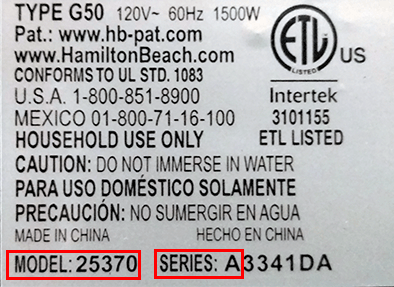
Q Model Information: Where can I find the model, type and series number of my coffeemaker?
A Model number, type number, series number, and wattage information are located on the rating label, which is on the bottom or rear of your coffeemaker. It may be a sticker or engraved into the plastic.
Q Model Information: How do I determine the wattage?
A Watts are determined by multiplying the amps by the volts.
Q Model Information: How do I determine the amps?
A The amps are determined by dividing the volts into the watts. Example: volts = 120, watts = 1000. Therefore, 1000 divided by 120 = 8.3 amps.
Q Model Information: What parts are replaceable?
A Tank, lid, filter, basket filter, water filter, seal and descaler.
Q
Clean: What is the best way to clean the inside of my Automatic Drip Coffeemaker?
A
  1. Place empty carafe on Keep-Hot Plate and place empty filter basket into coffeemaker. Firmly close rotating filter cover.
  2. Pour one pint of plain white vinegar (or coffeemaker cleaner and descaler) into the reservoir.
  3. Turn ON coffeemaker.
  4. After 30 seconds turn OFF.
  5. Wait 30 minutes to allow the vinegar to clean. Then turn ON again. When the brew cycle is finished, turn OFF.
  6. Empty carafe and rinse. Pour one carafe of cold water into the reservoir. Place carafe on Keep-Hot Plate
  7. Turn ON. When the brew cycle is finished, empty the carafe. Repeat this process with one more carafe of cold tap water.
  8. Turn OFF when complete.
  9. Wash carafe and filter basket before making a beverage.
Refer to your Use & Care guide for tips specific to your coffeemaker.
Q Clean: How should I clean coffee stains in my stainless steel thermal carafe? 
A Fill the stainless steel thermal carafe with boiling water and add a dishwasher tablet. Let it sit overnight, then rinse thoroughly the next day.
Q Clean: How often should I clean my Automatic Drip Coffeemaker?
A Cleaning prolongs the life of the coffeemaker. We suggest that those coffeemakers that are used daily be cleaned monthly.
Q Clean: Are any of the parts dishwasher-safe?
A Most carafes are top-rack dishwasher safe.  Refer to the Use & Care guide that accompanied your coffeemaker to learn about your specific carafe (available online). Never use the Sanitize cycle: it heats to extremely high temperatures and may damage your product.
Q Parts: Where can I purchase replacement parts? 
A Replacement parts are available at some local discount and department stores; otherwise, carafes, replacement water filters, etc. can be purchased directly through our our web site and toll-free Consumer Service Line (800.851.8900) or from a Master Parts Distributor. 
Q Parts: Can I purchase a heating element or any internal part?
A No. We do not intend for coffeemakers to be repaired.  Internal parts are not sold to consumers.
Q BrewStation: My BrewStation does not seem to be pumping the water through, or it may start and stop. How can I fix this problem?
A Clean the unit with a decalcifier (like CLR), according to the instructions in your Use & Care guide (available online).  Most of the time, decalcification will correct the problem because the unit may just be clogged.
Q BrewStation: My BrewStation has started to dispense coffee more slowly than usual. How can I fix this?
A You may have a clogged screen in the bottom of the brew tank. Try using an old toothbrush to gently clean the mesh screen and rinse away the buildup.
Q BrewStation: Why is my BrewStation tank leaking? 
A You may have buildup in the tank seal. Turn the brew tank upside down over the kitchen sink, then press the dispensing valve (on the bottom of the tank) and flush with water for 30 seconds.
Q Features: What does the star on the clock display mean?
A The unit needs to be cleaned. Use a decalcifier as instructed in the Use & Care guide (available online).
Join Us:
Go